

Research verified 2026-11-05
“How to create a newsletter” in Google often means two different jobs. One is design a pretty layout (Canva, Visme, HubSpot’s newsletter builder pages sit high in the SERP). The other is send issue #1 to a list you own — with a subject line, an unsubscribe path, and a tool that will still work after month one.
This page is the second job: purpose → email tool (ESP) → free-plan fit → first-issue skeleton → send. It is not a Canva tutorial and not a print/school newsletter guide.
If you already have a website and only need the subscribe box, use How to add a newsletter signup to your website instead. If you only need free-plan breakpoints, jump to Free email marketing tools.
Affiliate disclosure: Systeme.io links below are affiliate links. If you sign up through them, SoloPicked may earn a commission at no extra cost to you. Kit and MailerLite links are official only (not affiliate). Full details: affiliate disclosure.
We did not run a lab of “12 newsletters launched.” Free-tier numbers reuse the 2026-11-05 official check already published on our free-tools page. Missing UI screenshots are marked — we do not invent them.
Decide before you open a template
Write these four answers somewhere you will see them when you compose issue #1:
- Purpose — one sentence: what problem does each issue solve for the reader?
- Reader — who is this for on day 30, not “anyone interested in my niche.”
- Cadence — weekly, biweekly, or monthly (pick one; change later with a notice in the email).
- Send tool — an ESP that can hold a list, send, and unsubscribe — not a design file alone.
Templates come after those four. Starting in a design maker without a send path is how people end up with a beautiful PDF and no way to email it legally at scale.
ESP vs design “newsletter maker”
| Email tool (ESP) | Design maker (Canva / Visme / similar) | |
|---|---|---|
| Owns a subscriber list | Yes | Usually no (or not built as your primary ESP) |
| Sends email with unsubscribe | Yes | Design export ≠ sending infrastructure |
| Fits this guide | Kit, Systeme.io, MailerLite, and peers | Fine for graphics inside an ESP email — not a replacement for step 4 above |
SERP pages for Canva, Visme, and HubSpot builders answer “make a layout.” SoloPicked’s angle is “make a sendable newsletter.” You can still design in Canva and paste assets into Kit/Systeme/MailerLite — just do not stop at the PDF.
Pick a free plan for the first 90 days
Numbers below are from vendor pages checked 2026-11-05 (same table as our free-tools article). Vendors change limits — confirm on the source before you commit.
| Kit Free | Systeme.io Free | MailerLite Free | |
|---|---|---|---|
| Cap that matters first | 10,000 subscribers; no sequences / visual automations on Free | 2,000 contacts; 3 funnels; 1 automation rule | 250 subscribers; 2,500 emails / month; 3 active forms |
| Sending on Free | Unlimited broadcasts | Unlimited email sends | 2,500 monthly emails |
| Over the limit | Must upgrade to keep sending; content kept | Opt-in forms & payments stop; cannot add contacts; emails/new automations pause | Campaigns + automation sending locked |
| Source | Kit Free plan help | systeme.io/pricing | MailerLite pricing |
Quick fit:
- Broadcast-first writer, list may grow large, welcome sequence can wait → Kit Free is the usual match. Official: kit.com / Free plan help. Paid math: ConvertKit (Kit) pricing, Kit vs Mailchimp.
- Want free funnel + opt-in + one automation on a budget → Systeme Free. Start here (affiliate): systeme.io. Deeper: Systeme.io review, Systeme.io pricing.
- Need free automations now but list stays tiny → MailerLite Free — watch the 250 / 2,500 walls. Official: mailerlite.com/pricing.
Full breakpoint narrative: Free email marketing tools. We do not state Mailchimp, Brevo, or HubSpot free caps on this page — those were not in the 2026-11-05 SoloPicked free-tier check.
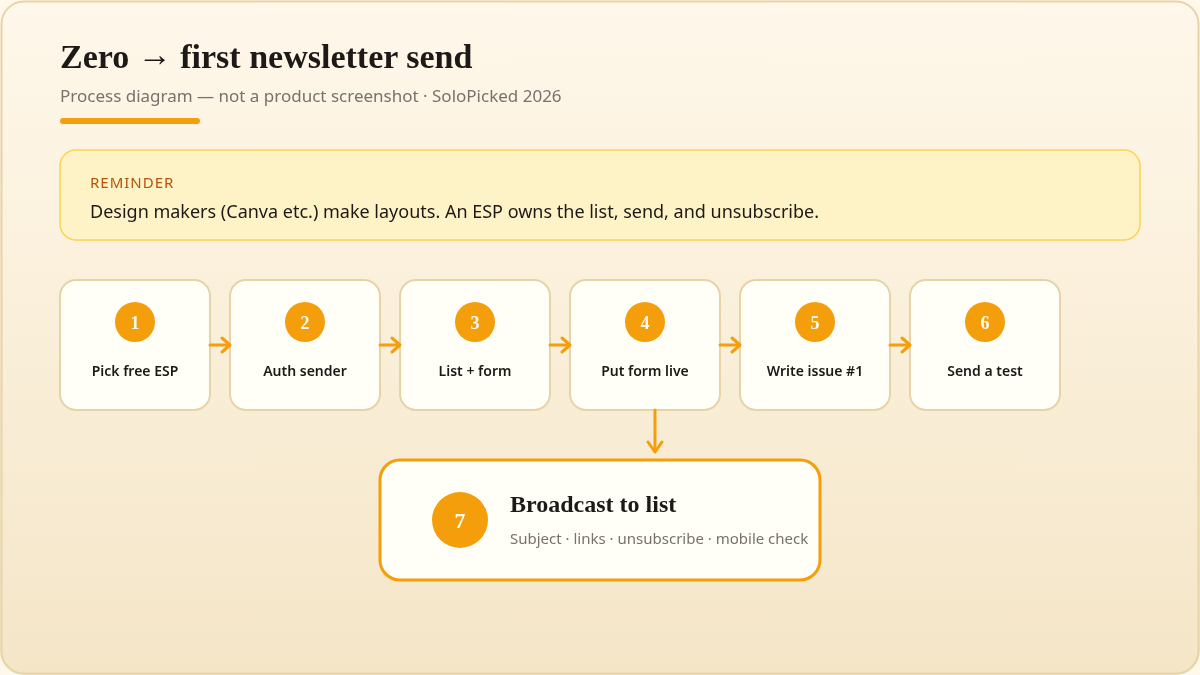
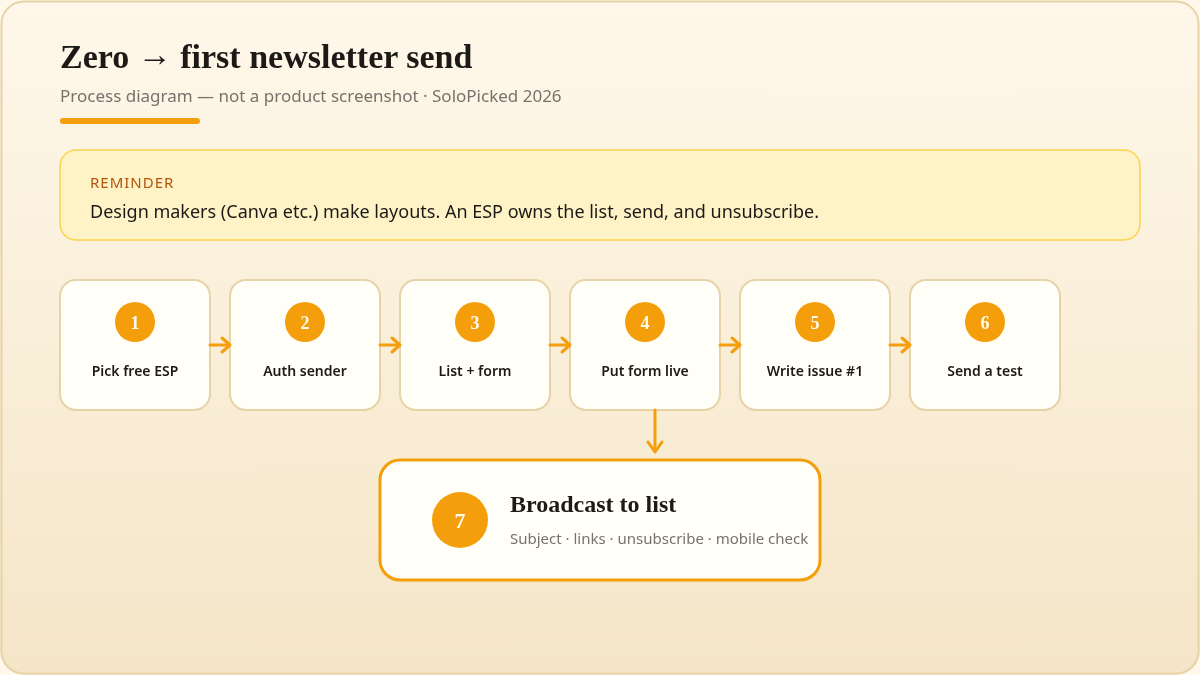
Illustrated process diagram (warm amber / cream). Not vendor UI.
Zero to first send (checklist)
Treat this as a checklist, not a timed guarantee. We have no verified “minutes to first send” benchmark.
- Create the ESP account on the free plan you picked above.
- Complete whatever domain / sender authentication checklist the ESP shows before a real broadcast. We are not publishing SPF/DKIM/DMARC DNS recipes here — follow the vendor wizard; inventing records is worse than waiting a day.
- Create the list path: a signup form or a clean import of people who already opted in. Do not buy a list.
- Put the form somewhere people can find it — site footer, about page, or end of posts. If you already have a site, follow add a newsletter signup (WordPress / Squarespace / Wix / static).
- Compose issue #1 using the skeleton below.
- Send a test to yourself (and one friend if you can). Check subject, links, unsubscribe, and how images load on mobile.
- Send the broadcast to the live list (or the first confirmed segment only).
Kit Free note: unlimited broadcasts are available, but email sequences / visual automations are not on Free — a multi-step welcome series may require upgrade or another tool. Systeme Free note: you get 1 automation rule and 3 funnels; do not assume that equals an unlimited drip library. MailerLite Free note: automations are listed, but the 250 / 2,500 caps bite fast.
First-issue skeleton (plain text)
Copy, then rewrite in your voice. This is an editorial scaffold — not a screenshot of a vendor editor.
Subject: [Promise in under ~50 characters — what they get in this email]

Hi [Name or "friend"],

[1–3 sentences] Why you are getting this + what this newsletter is for.

## This issue
- Point 1 (one idea, one example)
- Point 2
- Point 3 (optional)

## One thing to try
[Single CTA — reply, click one link, or one small homework. Prefer one CTA.]

## What's next
[Cadence reminder: "Next note lands [day/week]."]

—
[Your name]
[One-line who you help]

[Physical mailing address — required for many commercial email rules]
[Unsubscribe link — provided by your ESP; do not remove it]
Keep the body short for issue #1. One clear CTA beats three competing links. Footer address + unsubscribe stay even if the design is minimal.
What to write and how often (keep this short)
You do not need a separate “writing newsletter” product page. For the first month:
- Cadence: weekly if you already publish weekly elsewhere; otherwise biweekly or monthly until you have a backlog of three drafted issues.
- Length: enough to deliver one useful idea — often 400–800 words equivalent, or three tight bullets plus one story. We are not asserting an open-rate optimum.
- Topics: same promise as your signup page. If you promised “solo creator email tips,” do not send a random travel diary in week two without resetting expectations.
- Batching: draft two issues before you announce a weekly cadence so a bad week does not break the promise.
Common failures (avoid these)
- Bought or scraped lists — high complaint risk; not a growth hack.
- No unsubscribe / no clear sender identity — US commercial email has statutory rules. Open the FTC CAN-SPAM compliance guide before you send; we are not paraphrasing its full checklist from a blocked automated fetch.
- Image-only emails with almost no text — often weaker in the inbox and harder to skim.
- Skipping the test send — broken links and “Hello
{FirstName}” tokens ship more often than people admit. - Promising a sequence you cannot run on Free — e.g. Kit Free without sequences, or Systeme Free after you already spent the single automation rule.
FAQ
How do I create a newsletter for free?
Pick an ESP free plan that matches your first breakpoint (table above), add a signup path, write issue #1 with the skeleton, send a test, then send. “Free” still ends — details in free email marketing tools.
How do I start an email newsletter if I have no list yet?
Start with a form on a page you control and invite people who already know you (social bio, existing clients, personal network). Do not buy names to fake traction.
Is a Canva newsletter the same as an email newsletter?
No. Canva (and similar makers) help you design. An ESP helps you send, manage consent, and unsubscribe. Use design tools inside an ESP workflow if you want polish.
I already have a website — is this the right page?
Use How to add a newsletter signup to your website for the embed/block steps, then return here for the first-issue checklist.
Soft next step
- Write the four decisions (purpose, reader, cadence, ESP)
- Open the matching free plan and finish its sender checklist
- Ship issue #1 with one CTA
- Only then optimize design
All-in-one free funnel path: Try Systeme.io Free (affiliate). Broadcast-first writer path: Kit’s official free plan docs linked above — SoloPicked has no Kit affiliate link yet.