

Affiliate disclosure: This post contains affiliate links. If you buy through them, SoloPicked may earn a commission at no extra cost to you. We do not publish fake hands-on tests; this guide is based on published pricing, feature documentation, and fit for solo blogging budgets. Read our affiliate disclosure.
The best SEO tool for a solo blogger is not the one with the biggest database. It is the one you can keep paying for after month three. Most “best SEO tools” lists are written for agencies with five-figure software budgets, then repackaged for people running one blog from a laptop. That is backwards. A solo blogger needs keyword evidence, technical sanity checks, and a repeatable content workflow — not enterprise rank-tracking seats.
This guide compares the realistic 2026 budget options: Ahrefs entry tiers, Semrush’s entry plan, Surfer, the Google Search Console free stack, and a low-cost keyword extension like Keywords Everywhere. Prices and limits change often, so treat every number here as an approximate planning figure and verify on the vendor’s pricing page before you buy.
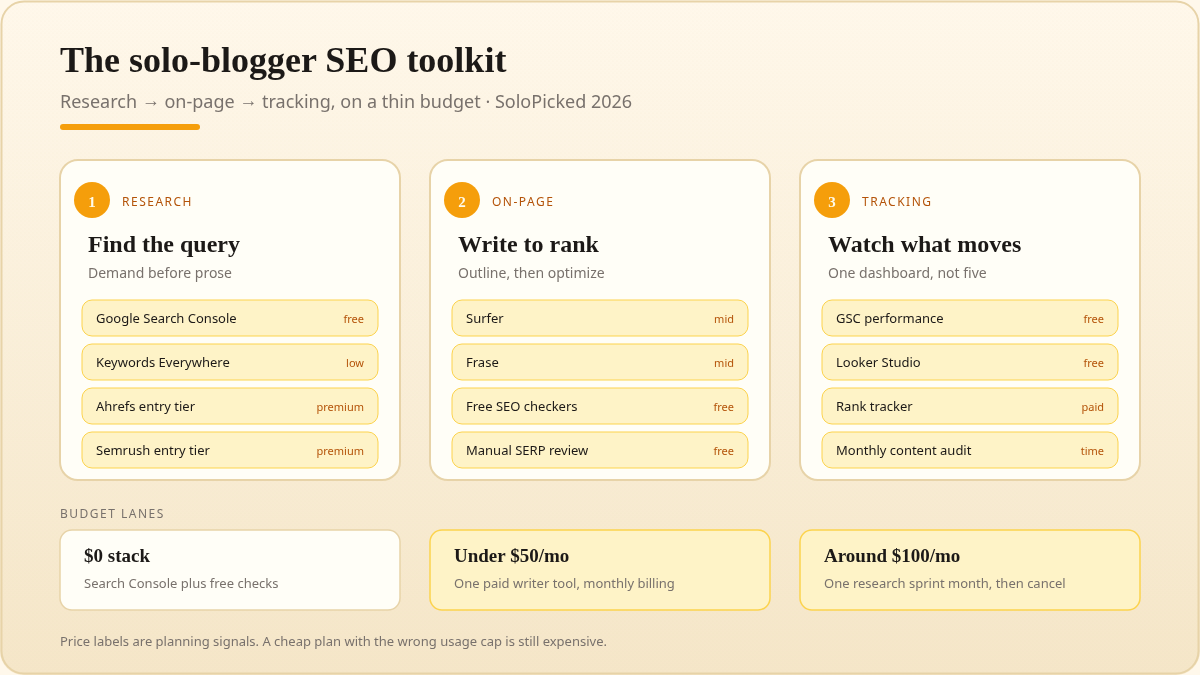
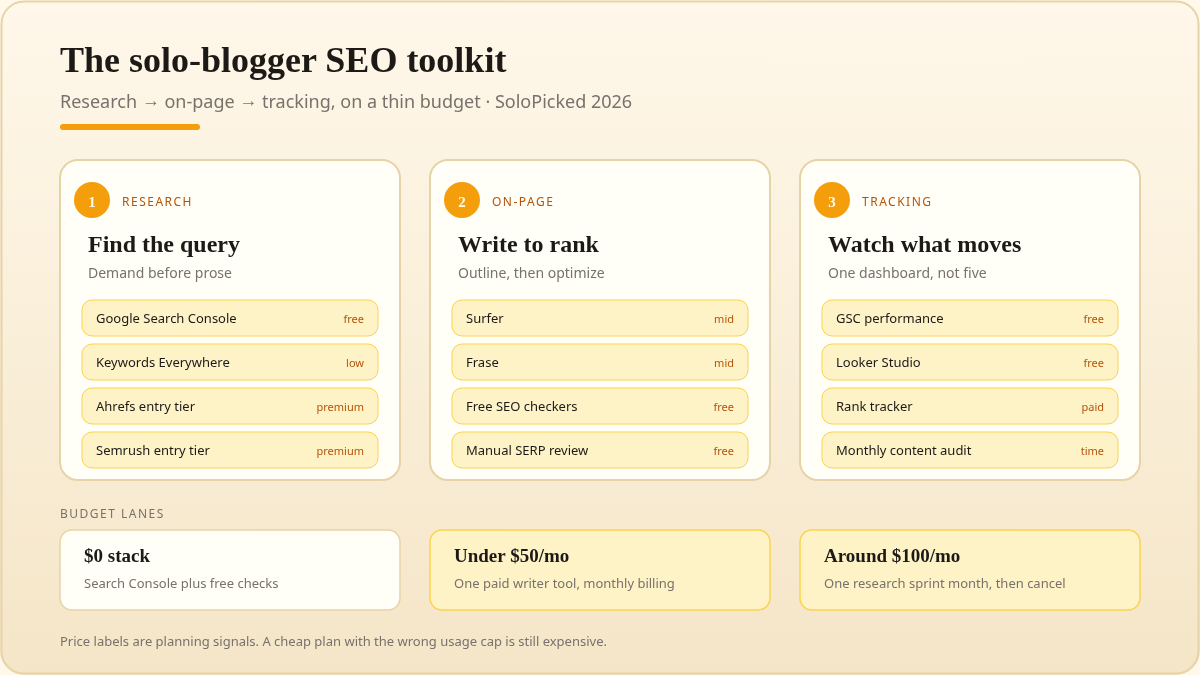
Illustrated chart (warm amber / cream). Not vendor UI.
How we judged “budget” SEO tools
We used six criteria that matter for a one-person blog:
- Entry price and billing terms. A $99 monthly plan is not budget if it requires annual prepayment. Monthly flexibility matters more than a small discount when your blog income is still uneven.
- Usage limits. Credits, tracked keywords, projects, and export caps decide whether a cheap plan is actually usable. A low price with a 1-project limit can still work for one blog; it fails for a portfolio.
- Overlap with free tools. Google Search Console already gives you query data for your own site. Paying for a tool that duplicates that data is waste.
- Output quality. A tool should help you publish or fix something, not just generate dashboards. Keyword lists, content briefs, audit tasks, and backlink opportunities are outputs.
- Upgrade pressure. Some entry tiers are deliberately crippled. If the first useful feature sits two tiers up, the entry price is marketing.
- Cancellation and trial friction. Solo bloggers should be able to run a one-month research sprint and cancel without a sales call.
We also weighted learning curve. A solo blogger has no SEO team. A tool that takes two weeks to understand has a hidden cost.
Comparison table: budget SEO tools for solo bloggers
Prices are approximate monthly USD equivalents at the entry tier, often billed annually where vendors advertise that rate. Limits and plan names change; verify before purchase.
| Tool | Best for | Entry price (approx.) | Free option | Main budget catch | Budget verdict |
|---|---|---|---|---|---|
| Ahrefs | Backlink research, keyword gaps, site audits | $29+ Starter; $129+ Lite | Ahrefs Webmaster Tools for verified sites | Starter is limited; Lite is the real research tier | Buy for monthly research sprints, not permanent idle access |
| Semrush | All-in-one SEO, PPC, content, competitor tracking | $140+ Pro | Limited free account and short trials | Entry plan is priced for businesses, not hobby blogs | Trial or one-month sprint only for most solo bloggers |
| Surfer | Content optimization and SERP-led briefs | $99+ Essentials | No permanent free plan; trial varies | Useful only if you publish optimized posts consistently | Buy after you have keyword demand and a publishing cadence |
| Google Search Console + free stack | Query data, indexing, technical basics, free keyword ideas | $0 | Yes | Limited competitor data and no content scoring | Start here; it is non-negotiable |
| Keywords Everywhere | Quick keyword volume/CPC checks in the browser | Low-cost credit packs, often around $15 to start | Limited free credits | Credit-based; not a full SEO suite | Good cheap add-on, not an Ahrefs replacement |
1. Ahrefs entry tiers: the benchmark, with a budget caveat
Ahrefs is still the reference point for backlink data and keyword research. For a solo blogger, the question is not “Is Ahrefs good?” It is “Which Ahrefs tier is the minimum useful one, and can I justify it monthly?”
Ahrefs now splits entry access across a low-cost Starter plan and a higher Lite plan. Starter is attractive because it lowers the entry barrier, but it comes with tighter project and usage limits. Lite is closer to what most bloggers imagine when they say “Ahrefs” — more data, more reports, more room to research. Neither is a full agency replacement, and both are credit-limited compared with higher tiers.
The budget-friendly move is to use Ahrefs as a research sprint tool. Pick one month when you need to:
- find keyword gaps between your blog and three competitors;
- audit backlinks and disavow obvious spam;
- build a 20-post content map;
- check whether a niche has enough low-competition demand.
Then cancel or downgrade until the next sprint. If you run one blog, Ahrefs Starter can be enough for a small site, especially when paired with Google Search Console. If you also do client work or run multiple sites, Lite is the more honest entry point.
Do not ignore Ahrefs Webmaster Tools. It is free for verified sites and gives you site audit and backlink data for your own domain. It will not replace competitor keyword research, but it removes some of the urgent need to pay every month.
Budget verdict: Best-in-class data, but buy it for a defined job. If you only need “some keyword volume,” a cheaper extension plus Search Console may be enough.
2. Semrush entry plan: powerful, but rarely the first purchase
Semrush is the broadest all-in-one in this comparison. It covers organic research, keyword magic, backlinks, technical audits, PPC, and content templates. For a solo blogger, that breadth is also the problem: you pay for modules you may never open.
The entry Pro plan is typically around $140 per month, which is more than many solo blogs spend on hosting, domain, email, and a stock photo subscription combined. Semrush does offer trials and occasional promotions, but a trial is not a budget strategy. It is a research window.
Where Semrush makes sense for a solo blogger:
- You already earn enough to justify a $100+ monthly software line.
- You want one dashboard for SEO and paid search while validating a product or affiliate niche.
- You need competitor ad copy and keyword overlap, not just blog post ideas.
- You are willing to use the trial for a specific project, export what you need, and decide afterward.
Where it does not make sense:
- You have fewer than 30 posts and no traffic baseline.
- You only need keyword volumes and on-page checks.
- You are choosing between Semrush and paying a writer for one good post.
Budget verdict: Semrush is excellent, but for most solo bloggers it is a later-stage tool. Start with Search Console and a cheap keyword source; graduate to Semrush when you have revenue to protect or a competitor research question that free tools cannot answer.
Check Semrush trial and Pro pricing
3. Surfer: content optimization only pays off with publishing cadence
Surfer is a content optimization tool. It analyzes the current SERP, extracts recommended terms and structure, and gives you a content editor score. It is not a keyword research database in the Ahrefs sense, and it is not a technical crawler. That matters because bloggers often buy Surfer expecting it to replace a full SEO suite.
The entry Essentials plan is typically around $99 per month. At that price, Surfer only makes financial sense if you are publishing consistently and targeting commercially useful queries. If you publish two casual posts a month, the subscription costs more than the content is likely to earn.
Surfer is most useful when:
- you already have a keyword with clear intent and need a brief;
- you are updating old posts and want to compare against current SERP expectations;
- you write or edit your own content and want a repeatable checklist;
- you publish at least four to eight substantive posts per month.
It is least useful when:
- you have no keyword research process yet;
- you write purely for pleasure and do not monetize;
- you expect a “content score” to fix weak expertise or thin sourcing.
Budget verdict: A good second or third tool. Do not buy Surfer before you have keyword demand and a publishing rhythm. If you are on a thin budget, use Search Console queries and a manual SERP review first, then buy one month of Surfer when you have a batch of posts to optimize.
Check Surfer Essentials pricing
4. Google Search Console + free stack: the actual budget foundation
If you only take one recommendation from this guide, take this: Google Search Console is mandatory. It shows how Google indexes your site, which queries you appear for, your average position, and which pages get impressions but no clicks. That is real first-party data no paid tool can fully replicate.
The free stack for a solo blogger in 2026 should include:
- Google Search Console for queries, indexing, sitemaps, and Core Web Vitals signals.
- Bing Webmaster Tools for Bing/Copilot visibility and extra keyword data.
- Google Analytics 4 for behavior and conversion context, not just traffic counts.
- Google Keyword Planner for broad volume ranges and seasonal patterns.
- Google Trends for demand direction and comparison.
- Ahrefs Webmaster Tools for a free site audit and backlink snapshot of your own domain.
- Looker Studio for a simple Search Console dashboard you actually check.
The free stack has real limits. You will not get full competitor keyword databases, precise backlink indexes, or content optimization scores. You will get enough to find low-hanging queries, fix indexing problems, and decide which topics deserve a paid research sprint.
The workflow is simple:
- Publish a small cluster of posts around a problem.
- Wait for impressions in Search Console.
- Find queries ranking on page two or three.
- Improve those posts before writing new ones.
- Use a paid tool only when you need competitor or volume data the free stack cannot supply.
Budget verdict: Zero cost, highest priority. A solo blogger with Search Console discipline will usually beat a blogger with a $100 tool and no publishing cadence.
5. Keywords Everywhere: cheap keyword context, not a full suite
Keywords Everywhere is a browser extension that overlays keyword metrics — volume, CPC, competition — on search results and some supported sites. It is credit-based, and entry credit packs are often in the $15 range. That makes it one of the cheapest ways to add keyword context to your daily browsing.
It is useful for:
- quickly checking whether a blog topic has search demand;
- comparing keyword variations while reading a SERP;
- adding volume context to YouTube or Google searches;
- validating ideas before you open a heavier research tool.
It is not useful for:
- backlink analysis;
- technical site audits;
- rank tracking at scale;
- content optimization scoring;
- replacing a keyword database for a large content plan.
Credit-based pricing can also be confusing. Check whether credits expire, how many actions consume credits, and whether the extension supports the sites you actually use. For a solo blogger, the appeal is speed and low commitment, not depth.
Budget verdict: A sensible $15-ish add-on for idea validation. Do not mistake it for an Ahrefs Lite alternative. It complements a free stack; it does not replace a research database.
Check Keywords Everywhere credit pricing
Ahrefs Lite alternatives worth knowing
If Ahrefs Lite feels too expensive, the practical alternatives are usually Mangools and SE Ranking, plus the free stack above. Mangools is known for a lower entry price and a friendly interface; SE Ranking sits between budget and mid-market with rank tracking and audits. Neither matches Ahrefs’ backlink index, but for a solo blogger who mainly needs keyword ideas and rank tracking, they can be enough.
The key is not to stack three cheap tools that together cost $80. One $49 tool plus Search Console is usually better than three overlapping $19 tools. Pick the job first: keyword research, content optimization, or rank tracking. Then buy the cheapest tool that does that job well.
Who should pick what?
| Monthly budget | Recommended stack | Why |
|---|---|---|
| $0 | Google Search Console, Bing Webmaster Tools, GA4, Keyword Planner, Ahrefs Webmaster Tools | Covers indexing, query data, and basic audits |
| $15–$30 | Free stack + Keywords Everywhere credits, or one month of Ahrefs Starter | Cheap keyword context without a long commitment |
| $50–$100 | Free stack + Mangools or SE Ranking; add Surfer only for a content batch | Balances research and on-page work |
| $100–$200 | Ahrefs Lite or Semrush Pro for one month; Surfer only if publishing weekly | For blogs with revenue or a serious growth sprint |
| $200+ | One research database + one optimizer + rank tracking | Only when content is a real business line |
A few honest rules:
- Do not pay annually before you have used a tool for three months. Annual discounts are real, but they lock in a workflow you may abandon.
- Run research sprints. One month of Ahrefs or Semrush can produce a quarter of content ideas. Cancel after you export.
- Fix before you buy. Search Console often reveals that the problem is indexing or thin content, not a missing keyword tool.
- One research tool, one optimizer, maximum. Overlapping subscriptions are the most common budget leak.
- Track revenue per post, not just rankings. A cheap tool that helps you update three affiliate posts can outperform an expensive tool that generates 100 unused keywords.
FAQ
Is Ahrefs Starter enough for a solo blog?
For one small blog, often yes — especially if you use it for keyword and backlink research in focused sprints. Check the current project and credit limits. If you need deeper competitor data or run multiple sites, Lite is the more realistic tier. Pair either with the free Ahrefs Webmaster Tools for your own domain.
Is Semrush worth it for a single blog?
Only if you need its breadth or already earn enough to justify the entry price. Semrush’s Pro plan is usually overkill for a new blog with fewer than 30 posts. A trial or one-month sprint is a better budget move than an annual commitment.
Do I need Surfer if I already have Ahrefs?
No. They solve different jobs. Ahrefs helps you find demand and backlinks; Surfer helps you structure and optimize a draft against the SERP. Buy Surfer only if you publish consistently and want a repeatable content brief workflow.
Can I rank a blog with only free SEO tools?
Yes, especially in low-competition niches. Google Search Console, Bing Webmaster Tools, Keyword Planner, and manual SERP analysis can take a solo blog a long way. Free tools are weaker for competitor backlink research and precise keyword volumes, so add a paid sprint when those questions block you.
Are lifetime SEO tool deals worth it?
Usually not for a primary research database. Lifetime deals often come with usage caps, slower data refreshes, or uncertain long-term support. A cheap monthly plan you can cancel is safer than a large upfront payment for a tool you have not validated.
How often should a solo blogger pay for SEO tools?
Use paid tools in bursts: one month for keyword and competitor research, then cancel while you publish and measure. Keep only the free stack running continuously. Re-subscribe when you have a new content batch or a specific audit question.
What is the cheapest way to track rankings?
Google Search Console shows your average position for queries you already rank for, which is enough for most solo blogs. If you need daily rank tracking for specific keywords, a budget tool like Mangools or SE Ranking is usually cheaper than an Ahrefs or Semrush entry plan.
Final recommendation
For most solo bloggers on a thin budget, the 2026 stack is:
- Google Search Console + Bing Webmaster Tools + GA4 — free, mandatory, and the source of truth for your own site.
- Keywords Everywhere or a one-month Ahrefs Starter sprint — low-cost keyword context when you need to validate demand.
- A content optimizer only after you publish consistently — Surfer is good, but it is not a first purchase.
If you have revenue and need deeper competitor data, move to Ahrefs Lite or a one-month Semrush Pro sprint. If you need an Ahrefs Lite alternative at a lower entry price, compare Mangools and SE Ranking against the free stack before adding another subscription.
The budget-winning strategy is not finding the cheapest tool. It is avoiding tools you do not use. Start free, buy for a specific job, export what you need, and cancel when the job is done.
Affiliate disclosure: Some links above are affiliate links. We may earn a commission if you subscribe through them, at no extra cost to you. See our affiliate disclosure for details.